Feed Setup & Authentication
Introduction
Spotify only accepts deliveries of Audiobooks via SFTP following SSH-based authentication.
When onboarding your content ingestion feed, you will receive an email from our team with the appropriate information (Host, Port, User, and Delivery Path).
After you receive this, please create a new SSH key pair (RSA 2048-bit) and respond with your public key (the file ending .pub). Please do not send your private key to Spotify.
Our team will confirm when your public key has been configured, after which you may test your connection and begin deliveries.
Specific details about the structure of your book deliveries will be addressed in other articles.
FAQ
Q: Can I use a username and password instead?
A: We do not, and will not, support user/password based authentication for security reasons.
Q: How can I test that my connection works?
A: Connect to the SFTP then use the following commands
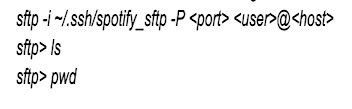
You should see your delivery path contents (or an empty directory if this is your first time connecting)
Q: Do you support any alternative delivery methods (e.g. Direct to AWS, GCP)?
A: No, not at this time.
Q: How do I update an existing public key?
A: If you generate a new RSA 2048-bit key pair, send us your new public key. Once we've confirmed you are configured, please test the connection and then let our team know the old key can be removed.
Q: Can I share an SSH key pair across multiple feeds?
A: We strongly recommend using unique key pairs for each feed/environment. This limits the impact if a single key is compromised.